# Snapshot Bot 监控

### Snapshot Bot 监控是什么？

Snapshot Bot 监控用于监控 Snapshot 提案，可监控新提案的产生，也可监控已存在提案的状态变更。

[了解 Snapshot 是如何工作的？](https://docs.snapshot.org/)

### Snapshot Bot 监控典型场景

1. 新提案的发布
2. 提案进入投票阶段
3. 提案投票结束
4. 提案被删除

**支持的数据源**

| 数据源      | 类型        | 稳定性 |
| -------- | --------- | --- |
| Snapshot | off chain | 高   |

### 如何配置 Snapshot Bot 监控？

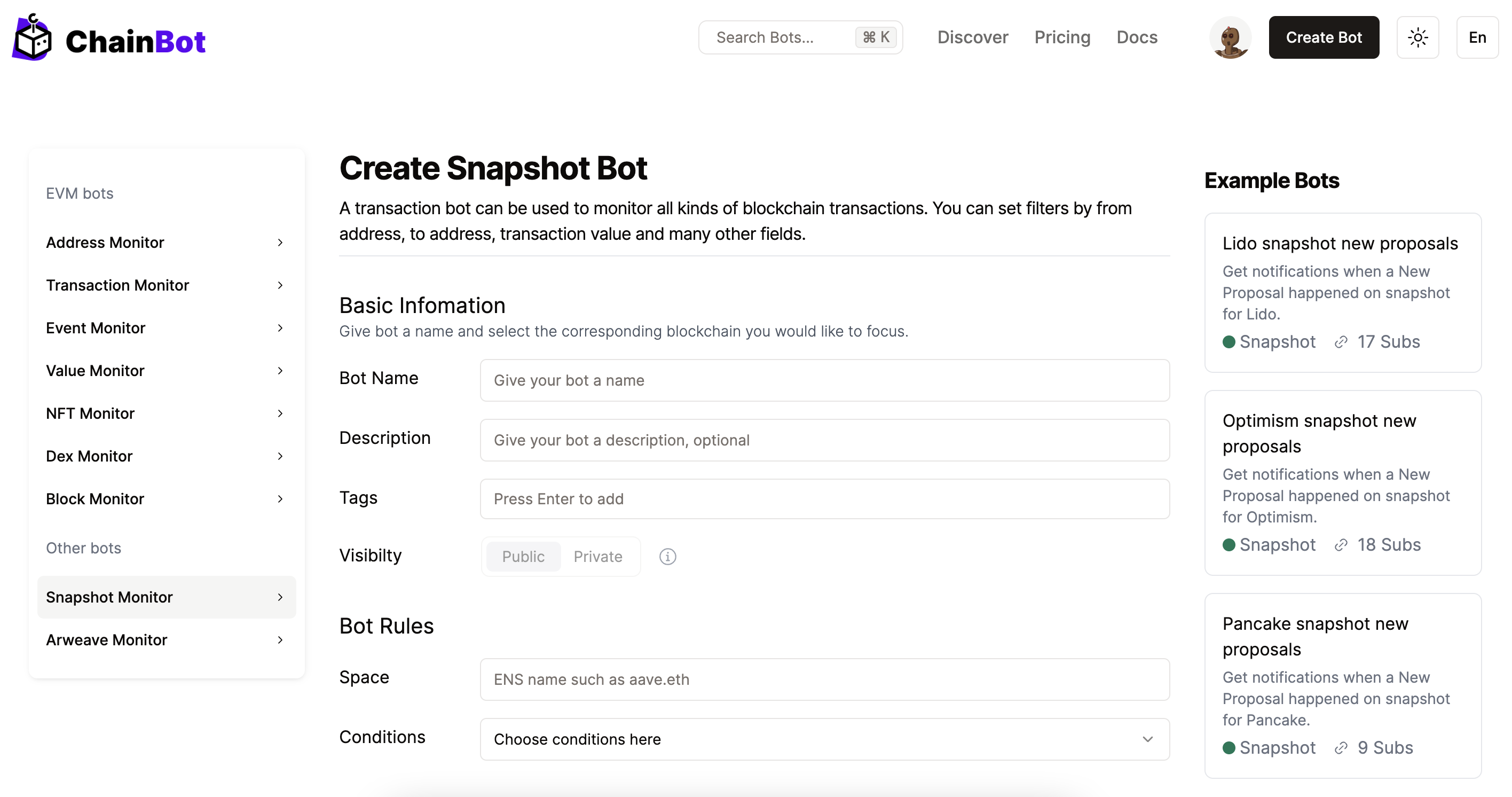
登录 ChainBot 平台后，右上角 "Create Bot" -> "Snapshot Monitor"。

<figure><img src="/files/G2a91uYem6YioEADU4ty" alt=""><figcaption><p>Create a Snapshot Bot</p></figcaption></figure>

#### Info 说明

| 字段名   | 说明                               | 是否必填 |
| ----- | -------------------------------- | ---- |
| Name  | Bot 监控名称                         | 是    |
| Space | Snapshot 平台 space 名称，通常是 ENS 域名。 | 是    |
| Tags  | Bot 监控 tags，利于搜索                 | 是    |

#### Conditions 说明

<table><thead><tr><th>字段名</th><th width="249.33333333333331">说明</th><th>是否必填</th></tr></thead><tbody><tr><td>Event</td><td>支持的提案状态</td><td>是</td></tr></tbody></table>

#### Event 类型

| 类型               | 说明         |
| ---------------- | ---------- |
| proposal/created | 新提案产生      |
| proposal/start   | 提案进入投票阶段   |
| proposal/end     | 提案结束投票     |
| proposal/deleted | 提案被删除      |
| Any              | 为上述四个状态的父集 |

#### 模板变量

<table><thead><tr><th width="219.33333333333331">变量</th><th width="208">说明</th><th>示例</th></tr></thead><tbody><tr><td>$proposal.id</td><td>提案 ID</td><td>proposal/0x38c654c0f81b63ea1839ec3b221fad6ecba474aa0c4e8b4e8bc957f70100e753</td></tr><tr><td>$proposal.title</td><td>提案名称</td><td>SIP#20 Continued Balance and Rebalancing</td></tr><tr><td>$proposal.author</td><td>提案发起人</td><td>pistachiodao.eth</td></tr><tr><td>$proposal.state</td><td>提案状态</td><td>proposal/created</td></tr><tr><td>$proposal.network</td><td>提案网络，为 ChainID</td><td>1</td></tr><tr><td>$proposal.link</td><td>Snapshot 提案链接</td><td><a href="https://snapshot.org/#/stgdao.eth/proposal/0x714977397be501e7f854293401370ab89d8c9261f533d7bb551d0c29ade5755f">https://snapshot.org/#/stgdao.eth/proposal/0x714977397be501e7f854293401370ab89d8c9261f533d7bb551d0c29ade5755f</a></td></tr><tr><td>$event</td><td>提案状态</td><td>proposal/created</td></tr><tr><td>$space</td><td>提案的 Space</td><td>pistachiodao.eth</td></tr><tr><td>$time</td><td>提案产生时间</td><td>2022-11-29T03:20:46+08:00</td></tr></tbody></table>

#### 默认通知模板

{% code overflow="wrap" lineNumbers="true" %}

```shell
[{$bot.name}]
Proposal: {$snapshot.proposal.title}
Space: {$snapshot.space.id}
Event: {$snapshot.event}
Time: {$snapshot.time}
Detail: {$snapshot.proposal.link}
```

{% endcode %}

[了解告警通知模板？](/zh/advanced-features/alarm-notification-template.md)

#### 通知消息示例

> \[ Stargate new proposal]
>
> Proposal: SIP #16 - New Assets - DAI, FRAX, sUSD, LUSD
>
> Space: stgdao.eth
>
> Event: proposal/created
>
> Time: 2022-09-30T19:23:47+08:00
>
> Detail:<https://snapshot.org/#/stgdao.eth/proposal/0xe6fef4aa9c8e9d162f694ab764b11c06918b9f199aafe43e0d85b12d8271011c>
>
> Created By [ChainBot.io](https://www.chainbot.io)

#### Snapshot Bot 监控案例

[Snapshot Bot 案例](/zh/bot-case/snapshot-bot-demo.md)


---

# Agent Instructions: Querying This Documentation

If you need additional information that is not directly available in this page, you can query the documentation dynamically by asking a question.

Perform an HTTP GET request on the current page URL with the `ask` query parameter:

```
GET https://docs.chainbot.io/zh/basic-usage/bots/snapshot-bot.md?ask=<question>
```

The question should be specific, self-contained, and written in natural language.
The response will contain a direct answer to the question and relevant excerpts and sources from the documentation.

Use this mechanism when the answer is not explicitly present in the current page, you need clarification or additional context, or you want to retrieve related documentation sections.
