# NFT Bot Monitoring

### What is NFT Bot Monitoring?

NFT Bot Monitoring is primarily designed to track changes in NFT prices, order updates, and ownership transfers.

### Typical Scenarios for NFT Bot Monitoring

1. Monitoring changes in NFT floor prices
   1. BAYC NFT floor price is greater than 100E
   2. BAYC NFT floor price is less than 100E
2. Monitoring NFT transfers
   1. BAYC #1 is transferred from Address A to Address B
3. Monitoring offers received by specific NFT owners
4. Monitoring the actions of target addresses buying NFTs

**Supported Data Sources**

| Data Source | Type     | Stability |
| ----------- | -------- | --------- |
| Ethereum    | on chain | Very High |

#### Supported Data Sources

| Data Source | Type     | Stability |
| ----------- | -------- | --------- |
| Ethereum    | On-chain | Very High |

#### Supported Markets

| Market  | Stability |
| ------- | --------- |
| OpenSea | High      |

*\*We are planning to support more markets.*

### How to Configure NFT Bot Monitoring?

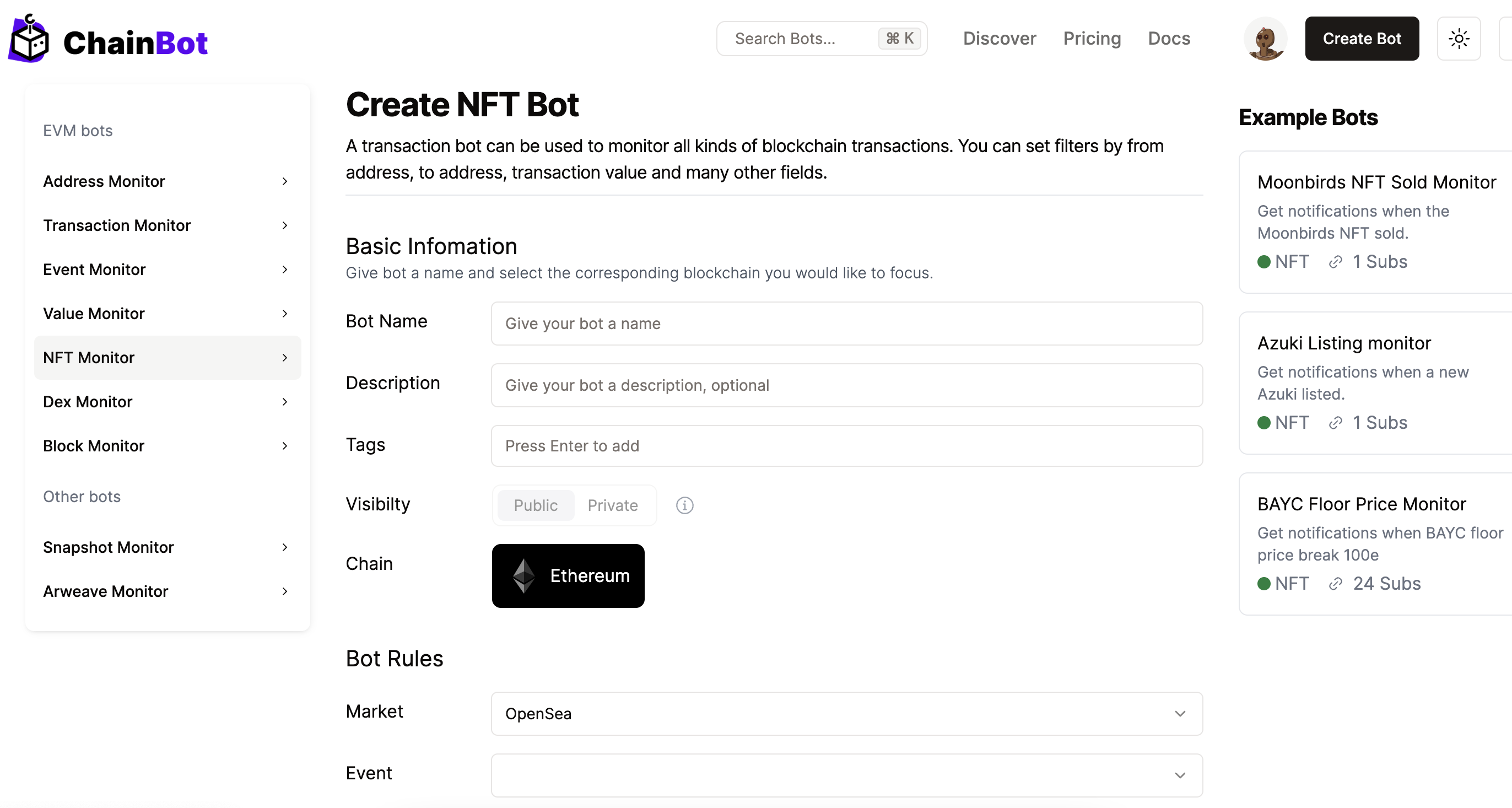
After logging into the ChainBot platform, go to the upper right corner and click "Create Bot" -> "NFT Monitor".

<figure><img src="/files/cbp06RJYj2cUQgfesc3f" alt=""><figcaption><p>Create a NFT Bot</p></figcaption></figure>

#### Info Description

| Field Name | Description                                 | Required |
| ---------- | ------------------------------------------- | -------- |
| Name       | Bot Monitor Name                            | Yes      |
| Chain      | Select a supported blockchain               | Yes      |
| Contract   | Select an NFT contract, ERC 721 or ERC 1155 | Yes      |
| Market     | NFT trading market                          | Yes      |
| Event      | Type of NFT event                           | Yes      |
| Tags       | Tags for the Bot Monitor, useful for search | Yes      |

#### Event Types

<table><thead><tr><th width="313">Type</th><th>Description</th></tr></thead><tbody><tr><td>Listed</td><td>NFT is listed</td></tr><tr><td>MetadataUpdated</td><td>NFT metadata is updated</td></tr><tr><td>Sold</td><td>NFT is sold</td></tr><tr><td>Transferred</td><td>NFT ownership is transferred</td></tr><tr><td>ReceivedBid</td><td>Received a bid</td></tr><tr><td>ReceivedOffer</td><td>Received an offer</td></tr><tr><td>Cancelled</td><td>NFT listing is cancelled</td></tr><tr><td>FloorPrice</td><td>Collection floor price</td></tr></tbody></table>

#### Conditions Description

| Parameter    | Symbol       | Description         |
| ------------ | ------------ | ------------------- |
| makerAddress | ==           | Maker address       |
| takerAddress | ==           | Taker address       |
| price        | >, >=, <, <= | NFT price           |
| token\_id    | ==           | Token ID of the NFT |

#### Template Variables

<table><thead><tr><th width="283">Variable</th><th width="467">Description</th></tr></thead><tbody><tr><td>$taker.address</td><td>Taker address</td></tr><tr><td>$maker.address</td><td>Maker address</td></tr><tr><td>$collection.slug</td><td>NFT identifier on the platform</td></tr><tr><td>$item.opensea_link</td><td>Link to the item page on OpenSea</td></tr><tr><td>$item.token_id</td><td>Extract the final token ID from item.nft_id</td></tr><tr><td>$payment.symbol</td><td>Payment symbol, usually WETH</td></tr><tr><td>$payment.price</td><td>Sale price or base price, user needs to handle decimals</td></tr><tr><td>$payment.usd_price</td><td>Corresponding original payment.usd_price field</td></tr><tr><td>$quantity</td><td>Quantity of tokens, always 1 for ERC 721, could be multiple for ERC 1155</td></tr><tr><td>$transaction.hash</td><td>On-chain transaction hash</td></tr><tr><td>$transaction.timestamp</td><td>RFC3339 format timestamp</td></tr><tr><td>$subscriptions.name</td><td>Bot Monitor name</td></tr><tr><td>$monitor.market</td><td>Market monitored by the Bot, currently OpenSea</td></tr><tr><td>$event.type</td><td>Value listed like Listed, etc.</td></tr><tr><td>$event.timestamp</td><td>RFC3339 format timestamp</td></tr><tr><td>$chain.explore</td><td>Blockchain explorer prefix, <a href="https://etherscan.io/">https://etherscan.io/</a></td></tr></tbody></table>

#### Default Alert Template

{% code overflow="wrap" lineNumbers="true" %}

```shell
[{$bot.name}]
New {$nft.event} event for {$nft.slug} #{$nft.token_id} at {$nft.market}
View : {$nft.market_link}
Time: {$alert.time}
```

{% endcode %}

[Learn about alert notification templates?](https://github.com/ChainbotAI/doc-en/blob/master/advanced-features/alarm-notification-template/README.md)

#### Notification Message Example

> \[ Listed monitor for BAYC ]\
> New Listed event for friendship-bracelets-by-alexis-andre #24805 at opensea\
> View : <https://opensea.io/collection/friendship-bracelets-by-alexis-andre>\
> Time: 2022-11-30T14:07:23+08:00\
> Created By [ChainBot.io](https://www.chainbot.io)

#### NFT Bot Monitoring Case

[NFT Bot Monitoring](/basic-usage/bots/nft-bot.md)


---

# Agent Instructions: Querying This Documentation

If you need additional information that is not directly available in this page, you can query the documentation dynamically by asking a question.

Perform an HTTP GET request on the current page URL with the `ask` query parameter:

```
GET https://docs.chainbot.io/basic-usage/bots/nft-bot.md?ask=<question>
```

The question should be specific, self-contained, and written in natural language.
The response will contain a direct answer to the question and relevant excerpts and sources from the documentation.

Use this mechanism when the answer is not explicitly present in the current page, you need clarification or additional context, or you want to retrieve related documentation sections.
